
If you own a house, apartment, shop, or land in Ongole, then paying the property tax is something you probably deal with every year. The Ongole Municipal Corporation property tax is collected by the local municipal authority and used for maintaining important services in the city.
This money helps the municipality take care of things like roads, drainage systems, street lights, garbage collection, parks, and water supply. In simple words, property tax is one of the main sources that keeps the city running properly.
Earlier people had to visit the municipal office to check their tax details or make payment. It used to take time. But now most services are online, so property owners can check dues and pay tax within a few minutes.
In this article we will explain how to check Ongole property tax, how to pay it online in 2026, and some other useful details that property owners should know.
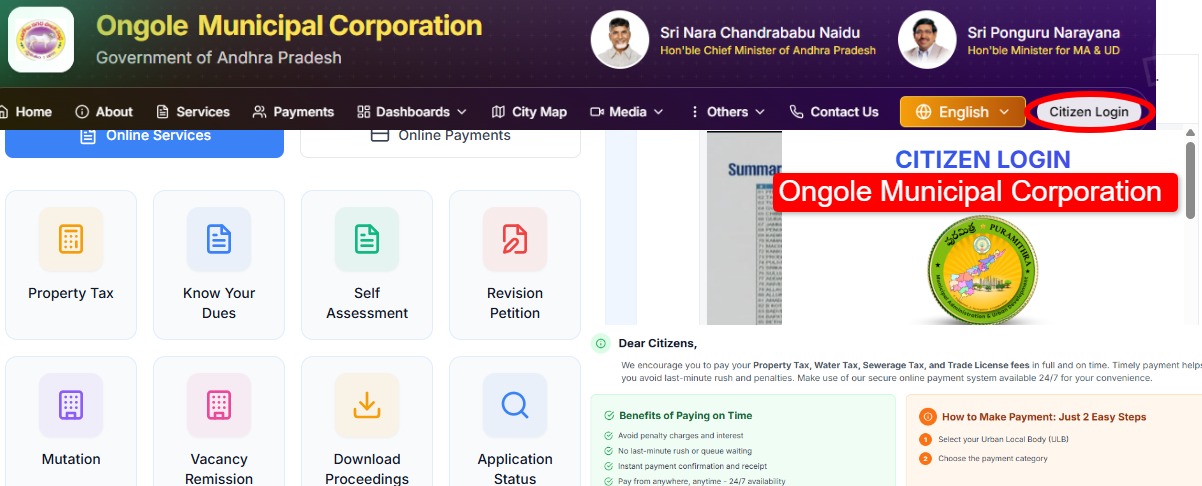
What is Ongole Municipal Corporation Property Tax?
Property tax is a local tax charged by the municipal corporation on properties that fall under its area. Every property owner needs to pay this tax yearly.
The amount collected is used by the municipality to maintain city infrastructure and public facilities.
Generally, property tax applies to:
-
Residential houses
-
Flats and apartments
-
Commercial buildings
-
Shops and offices
-
Vacant land within city limits
So if you own any of these properties in Ongole, paying this tax on time is important. If someone ignores it for a long time, penalties may be added.
Latest Update on Ongole Property Tax (2026)
In recent years, the Andhra Pradesh Municipal Administration Department has moved most municipal services to digital platforms. Because of this change, many services are now available through the CDMA municipal portal.
Residents can now easily:
-
Pay property tax online
-
Check pending dues
-
Use the property tax calculator
-
Download payment receipts
-
Apply for property corrections or updates
The online portal works 24/7, so people can access these services anytime without visiting the office.
Ongole Property Tax Due Date
Normally, property tax should be paid before March 31, which is the end of the financial year in India.
If the payment is delayed after this date, the municipality may charge:
-
Late payment penalty
-
Extra interest on the pending amount
So paying tax before the deadline is always a better option.
How to Pay Ongole Municipal Corporation Property Tax Online
Paying property tax online is quite simple. If you have your property details ready, the whole process usually takes only a few minutes.
Steps to Pay Tax Online
-
Open the Andhra Pradesh municipal tax portal.
-
Select Prakasam district.
-
Choose Ongole Municipal Corporation.
-
Search your property using:
-
Assessment Number
-
Door Number
-
Owner Name
-
-
Your property details will appear on the screen.
-
Check the pending tax amount.
-
Click on Pay Tax.
-
Complete payment using:
-
UPI
-
Debit card
-
Credit card
-
Net banking
-
After successful payment, you can download the digital payment receipt.
How to Check Ongole Property Tax Dues
Before paying the tax, many people prefer to check how much amount is pending. This can also be done online.
Steps to Check Dues
-
Visit the municipal services portal.
-
Click on Know Your Dues option.
-
Enter details such as:
-
Assessment number
-
Owner name
-
Door number
-
-
Click Search.
The system will show your property details and the tax amount that needs to be paid.
Ongole Property Tax Calculator
The municipal portal also offers a property tax calculator. This tool helps estimate the annual tax amount.
The calculation depends on several factors such as:
-
Type of property (residential or commercial)
-
Built-up area of the property
-
Year of construction
-
Number of floors
-
Usage category of the property
By entering these details, you can get a rough idea of the expected tax amount.
Mobile App for Ongole Property Tax Payment
The Andhra Pradesh government has also launched the PuraSeva Super App, which allows citizens to access multiple municipal services through their smartphones.
Using this app, residents can:
-
Pay property tax
-
Pay water bills
-
Submit complaints about civic issues
-
Track service requests
The app is available for both Android and iOS users.
Offline Property Tax Payment in Ongole
Even though online payment is easier, people can still pay their property tax offline.
Offline Payment Steps
-
Visit the Ongole Municipal Corporation office.
-
Provide your property assessment number.
-
Verify the tax details with the staff.
-
Make payment through:
-
Cash
-
Cheque
-
Demand draft
-
-
Collect the official payment receipt.
Municipal counters usually operate during working hours, and sometimes special counters are opened during peak tax collection periods.
Documents Required
In most cases, only a few details are required:
-
Property assessment number
-
Owner name
-
Property address
-
Aadhaar card (sometimes for verification)
-
Previous property tax receipt
These details help the system identify your property record.
Benefits of Paying Property Tax on Time
Paying property tax regularly has several advantages.
✔ Avoid penalties and extra charges
✔ Keep property records updated
✔ Support city infrastructure development
✔ Maintain proper legal documentation for your property
Timely payment also helps municipal authorities provide better services in the city.
FAQs
1. How can I find my Ongole property tax assessment number?
You can check it on your previous tax receipt or search your property on the municipal portal using the owner name or door number.
2. Can I pay property tax through UPI?
Yes, most municipal portals allow payment using UPI, debit card, credit card, and net banking.
3. What happens if property tax is not paid?
If the tax remains unpaid for a long time, penalties and interest may be added. In some cases, municipal authorities may start recovery actions.
4. Is there a mobile app to pay Ongole property tax?
Yes, residents can use the PuraSeva Super App to pay property tax and access several municipal services.