
So, if you’re living in the Badangpet Municipal Corporation (BMC) area, you probably know that tax season is kind of a pain. Honestly, I used to forget about my house tax until the last minute and then I’d be rushing to find my old papers. But actually… paying it online is way easier than it used to be.
I figured I’d write this quick post because the portal can be a bit confusing if you’re doing it for the first time. Plus, theres a little trick to save some money if you pay early.
First Things First: Grab Your PTIN
Before you even open the website, you need your PTIN (Property Tax Identification Number). It’s a 10-digit number. If you have an old receipt from last year, it’s printed right there at the top.
Just a heads up: If you just bought a new place or your property was recently assessed, your number might be different. Don’t panic—you can search for it on the site using your door number too.
The Steps (The easy way)
Anyway, here is the fastest way to get it done:
-
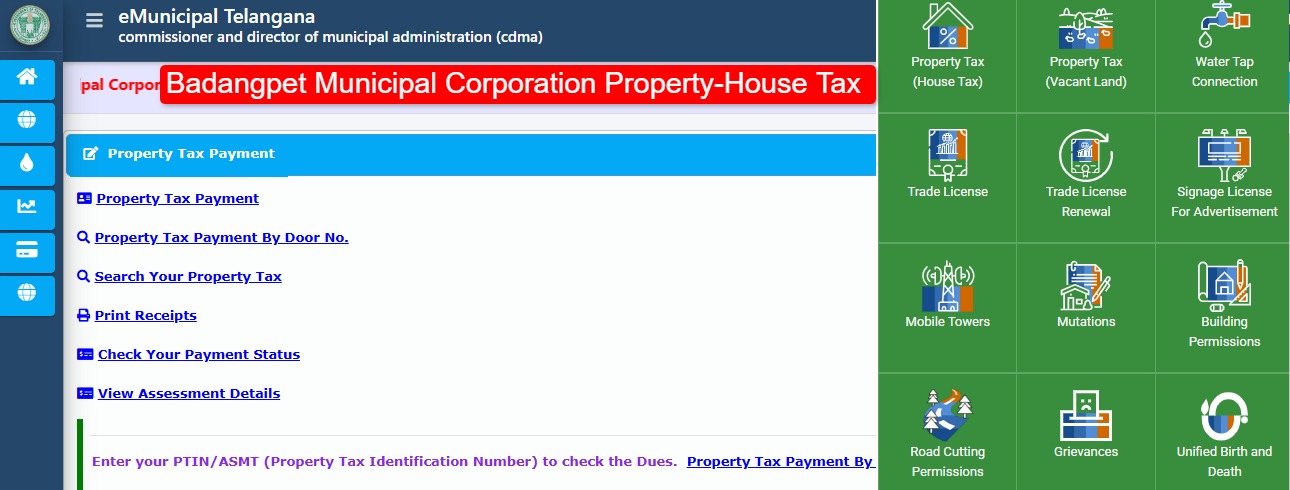
Go to the CDMA Telangana Portal: You don’t actually go to a “Badangpet only” site. You go to the main eMunicipal Telangana portal (it’s badangpetcorporation.telangana.gov.in).
-
Look for Property Tax: On the homepage, there is a big button for “Property Tax.” Click that.
-
Enter your PTIN: This is where you put in that 10-digit number. Make sure you don’t add any spaces!
-
Check the “Dues”: Once you hit search, your name and house details will show up. Check this part twice. I once almost paid for my neighbor’s house because I typed a 6 instead of a 9 lol.
-
Pay it: You can use UPI (GPay/PhonePe), net banking, or cards. UPI is usually the smoothest.
-
Download that Receipt: Don’t just close the window after the payment is done! Download the PDF. Sometimes the site glitches and it’s a nightmare to get the receipt later if you didn’t save it.
Wait, What About the Discount?
Okay, here is the pro tip. If you pay your property tax before April 30th, the government usually gives a 5% rebate. It’s not a fortune, but it’s basically free money for a few minutes of work. If you wait until after the deadline, they start adding interest (penalties), and nobody wants that.
Common Problems (And how to fix them)
-
The site won’t load? Use Google Chrome. For some reason, it acts weird on Safari or Firefox sometimes.
-
Payment failed but money gone? Don’t try again immediately. Usually, it updates in 24 hours. If not, you can email their support at
[email protected]. They actually respond eventually.
Conclusion That’s pretty much all there is to it. If you’re still stuck or your PTIN isn’t showing up, just drop a comment below and I’ll try to help out. Better to get it done now than wait until the last minute!