
So, if you live in Coonoor, you know how it is. We love the tea gardens and the weather, but nobody loves the “tax season” part of owning a house here. Honestly, I used to hate going all the way to the Municipality office and standing in those long lines just to pay my house tax… it felt like a whole day wasted.
But good news—you can actually do it all online now. It’s not 100% perfect (sometimes the site is a bit slow), but it’s way better than traveling in the rain to the office.
Here is a quick guide on how to get it done without the headache.
What You Need Before Starting
Don’t just jump into the website yet. You need your Assessment Number. If you have an old receipt from last year, look for it there.
Quick Tip: A lot of numbers were revised recently because of some “ward delimitation” thing. So if your old number isn’t working, don’t panic… you might need to check the “Old Assessment Number” section on the site to find your new one.
Step-by-Step: Paying Online
-
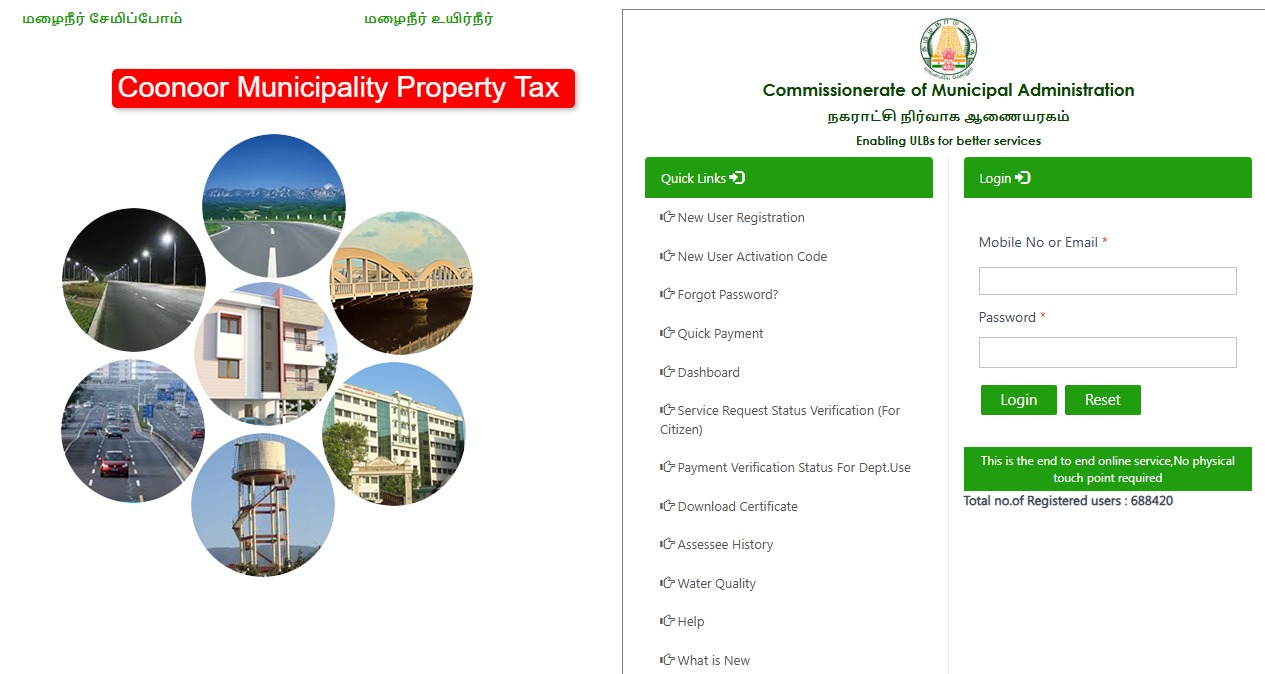
Go to the Official Site: Head over to the TN Urban ePay portal (it’s tnurbanepay.tn.gov.in).
-
Click on Quick Payment: You don’t actually need to make an account if you’re in a hurry. Just look for the “Quick Payment” button and select “Property Tax.”
-
Fill in the Details: Choose “Coonoor” from the list of municipalities. Then type in your Assessment Number.
-
Check Everything: Once you hit search, your name and the amount you owe should pop up. Please check this carefully. I once almost paid for someone else’s house because I typed one digit wrong!
-
The Payment Bit: You can pay using UPI (GPay/PhonePe), Credit Cards, or Net Banking. I usually use UPI because it’s fastest.
-
Download the Receipt: Once it says “Success,” don’t just close the tab. Download the PDF receipt and save it. Sometimes the email takes forever to arrive.
The 5% “Early Bird” Discount
Most people don’t know this, but if you pay your property tax before April 30th, the Coonoor Municipality actually gives you a 5% incentive. It’s not a huge amount, but hey… enough for a couple of good teas at Bedford, right?
Why Is My Payment Not Showing?
If you pay and the site still says “Payment Due,” just wait a day. Sometimes the system takes 24 hours to update. If it still doesn’t show after two days, you might have to take your digital receipt to the office, but usually, it works fine.
Wrapping it up… That is pretty much it. No more standing in queues. If you have any trouble with the portal, just leave a comment below and I’ll try to help out if I can!