
If you own a house, flat, shop, or any commercial property in Madhya Pradesh, paying property tax to the local municipal body every year is compulsory. This tax is collected by the Nagar Nigam, Nagar Palika, or Nagar Parishad, and the money is used to maintain important city services like roads, drainage systems, street lights, waste collection, and overall sanitation.
With the MP eNagarPalika portal, the government has made the process much easier and more convenient. Property owners can now check their tax dues, search property details, make payments online, and even download receipts — all from home.
In this guide, we’ll explain everything you should know about MP eNagarPalika Property Tax payment, property search, receipt download, and due checking process for 2026.
What is the MP eNagarPalika Portal?
The MP eNagarPalika portal is an official online platform launched by the Madhya Pradesh government to provide digital services related to urban local bodies.
Through this portal, residents can access several municipal services without visiting the office physically.
Some of the main services available include:
-
Property tax payment
-
Water bill payment
-
Property search and property details
-
Birth and death certificate services
-
Trade license related services
-
Online complaint registration
The biggest advantage is that the portal works 24×7, so citizens can use these services anytime without dealing with paperwork or queues.
Who Needs to Pay Property Tax in Madhya Pradesh?
Property tax must be paid by all property owners located within municipal limits.
This includes:
-
Residential house owners
-
Flat or apartment owners
-
Commercial building owners
-
Shop or office owners
-
Rental property owners
The tax amount is not the same for everyone. It usually depends on a few factors such as:
-
Property location
-
Built-up area of the property
-
Type of property usage (residential or commercial)
-
Municipal zone or ward
Most municipal bodies collect property tax once or twice a year, depending on their local rules.
MP eNagarPalika Property Tax Online Payment (Step-by-Step)
Paying property tax online through the portal is quite simple.
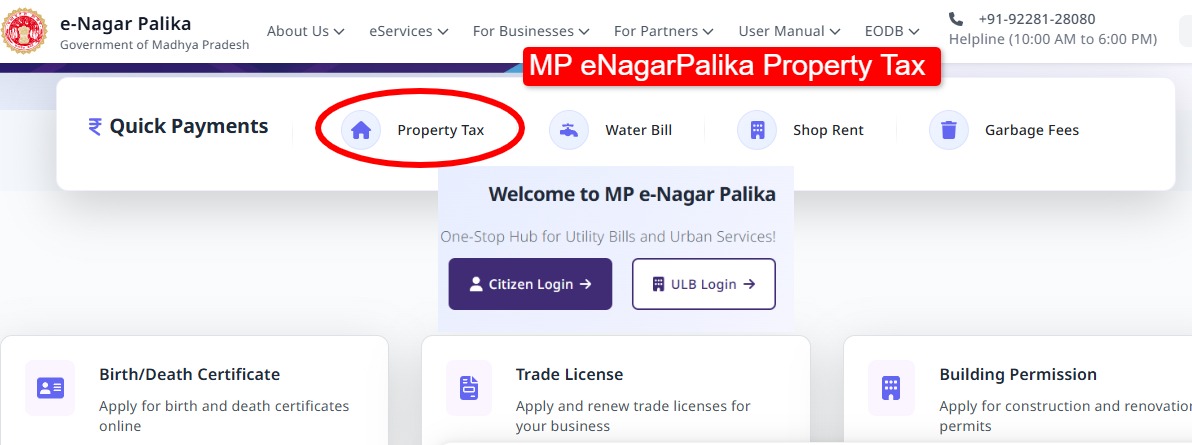
Step 1: Visit the Official Website
First, open the official portal:
https://www.mpenagarpalika.gov.in
Step 2: Open Property Tax Services
On the homepage, look for the Property Tax Service option under the e-Services section and click on it.
Step 3: Login or Register
If you are using the portal for the first time:
Click Sign Up and enter basic details like:
-
Name
-
Mobile number
-
Email ID
-
Aadhaar or PAN number
-
Password
Existing users can simply log in using their credentials.
Step 4: Enter Property Details
After logging in, you will need to enter your property information such as:
-
ULB name (Municipal body)
-
Property ID
-
Owner details
Step 5: Check Property Tax Bill
Once you submit the details, the portal will display:
-
Total property tax due
-
Previous payment records
-
Any outstanding amount
Step 6: Make the Online Payment
You can complete the payment using different methods like:
-
UPI
-
Debit card
-
Credit card
-
Net banking
After successful payment, a digital receipt is generated instantly, which you can download for future reference.
How to Search Property Details on MP eNagarPalika
Sometimes people don’t remember their Property ID. In that case, the portal also provides a property search option.
Steps to Search Property Details
-
Open the MP eNagarPalika portal
-
Click on Search Property Details
-
Enter details such as:
-
ULB name (city)
-
House number
-
Owner name
-
Zone or ward
-
-
Click Search
Your property information will appear on the screen.
This feature is very useful if you have forgotten your property ID.
How to Download Property Tax Receipt
After paying property tax online, you can download the receipt anytime from the portal.
Steps
-
Visit the portal
-
Login to your account
-
Go to Payment History
-
Select the transaction
-
Click Download Receipt
The receipt may be required for several purposes such as:
-
Home loan verification
-
Property sale documentation
-
Personal tax records
How to Check Property Tax Due in MP
Before making payment, you may also want to check if there are any pending dues.
Steps to Check Dues
-
Open the MP eNagarPalika portal
-
Go to No Due Certificate / Property Tax Due section
-
Enter the following details:
-
ULB name
-
Property ID
-
-
Click Search
The system will show whether your property has pending dues or a no-due status.
Benefits of Paying Property Tax Online
Using the eNagarPalika portal has several advantages.
1. Saves Time
You don’t have to visit the municipal office or stand in queues.
2. 24×7 Access
The portal is available anytime, so payments can be made whenever it’s convenient.
3. Instant Receipt
Digital payment proof is generated immediately after the transaction.
4. Better Transparency
All tax records and payment history remain available online.
5. Avoid Late Penalties
Paying online on time helps avoid extra charges.
MP eNagarPalika Mobile App
The Madhya Pradesh government has also launched the MP eNagarpalika mobile app, which allows citizens to access municipal services directly from their smartphone.
Using the app, you can:
-
Pay property tax
-
Pay water bills
-
Check municipal services
-
View property details
It basically works as a single digital platform for urban civic services in Madhya Pradesh.
MP Property Tax Helpline
If you face any problem related to property tax payment or the portal, you can contact the support team.
Helpline Number: 1800-233-5522
You can also register complaints online through the portal.
Important Tips for Property Owners
Before paying property tax online, keep a few things in mind:
-
Always verify your Property ID correctly
-
Check previous payment records before making payment
-
Download and save the payment receipt
-
Pay the tax before the due date to avoid penalties
FAQs
1. What is the official website for MP property tax payment?
The official portal for paying property tax in Madhya Pradesh is
mpenagarpalika.gov.in
2. Can I pay property tax online in Madhya Pradesh?
Yes, property owners can pay their property tax online through the MP eNagarPalika portal.
3. What details are required to check property tax?
To check property tax details, you usually need:
-
Property ID
-
Municipal body (ULB) name
4. Can I download the property tax receipt online?
Yes, after completing the payment, you can download the receipt from the Payment History section.
5. Is offline property tax payment still available?
Yes, property tax can still be paid offline by visiting your local Nagar Nigam or Nagar Palika office.