
So, it is that time of year again where the Nizamabad Municipal Corporation starts asking for our house tax. Honestly, I used to dread this because the old office was always so crowded and I never knew if I had the right papers. But I figured out how to do it online last week and it’s actually not as bad as people say.
If you’re like me and just want to get it over with from your phone while drinking chai, here is how you do it.
First thing—Find your PTIN
You can’t really do anything without your PTIN (Property Tax Identification Number). If you have an old receipt from last year, just look at the top… it should be there. If you lost it (dont worry, I lose mine every year), you can actually search for it on the website using your door number.
How to pay it (The simple steps)
I’m not gonna give you a 20-step guide because it’s basically just 3 things:
-
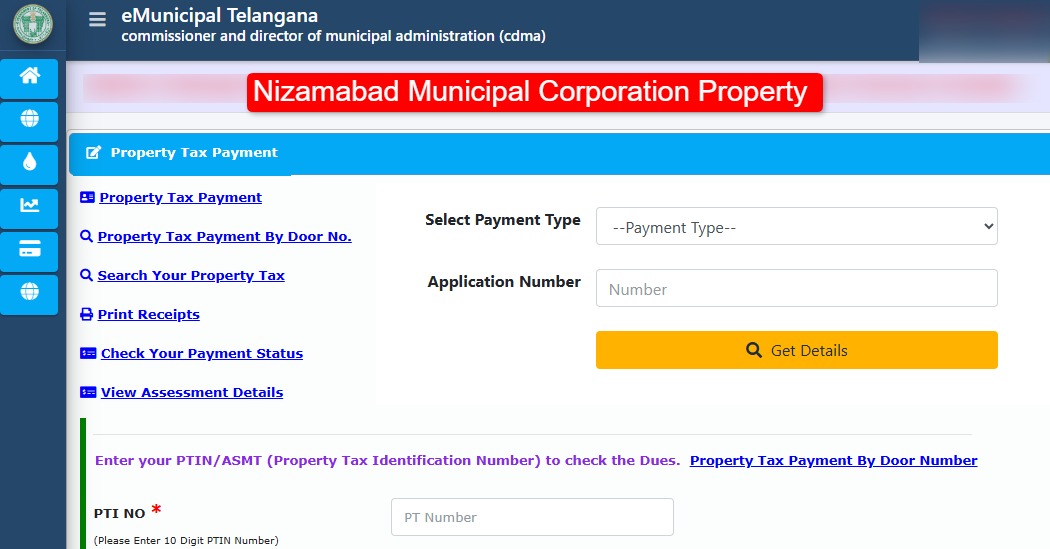
Go to the CDMA Telangana site: Don’t bother searching through the main corporation site, it just redirects you anyway. Go straight to the CDMA Property Tax portal.
-
Select Nizamabad: In the dropdown, make sure you pick “Nizamabad” (sometimes it lags a bit, just give it a second).
-
Enter your PTIN: Type in your 10-digit number. Then click “Know Property Tax Dues.”
-
Pay it: It will show how much you owe. You can use UPI, Credit Card, or whatever. I used GPay and it worked fine.
The “Early Bird” Secret
Okay, so here is the thing. If you pay before April 30th, you usually get a 5% discount. It might not seem like a lot but why give the government extra money if you dont have to? I also heard there was a 90% interest waiver on old arrears recently… so if you have’nt paid in years, now is probably the time to check.
Some small tips from my experience:
-
Download the receipt immediately: Once the payment is “Success,” a PDF button pops up. Click it. Don’t wait for an SMS or email because sometimes they just never come.
-
If the site crashes: It happens. Especially on weekends. Just try again early in the morning, like 7 AM.
-
Check your name: Double check the name on the screen before you hit pay. You don’t want to accidentally pay for your neighbor’s house (unless you really like them lol).
Anyway, hope this helps someone. It’s way better than standing in the sun at the office. If you’re stuck on a step, just drop a comment and I’ll see if I can help out!